Search

What are you looking for?

Enter at least 3 characters or an abbreviation, such as AI, BI, or HR.

Home › Solutions › HR and electronic personnel files
Astrafox solution

Electronic personnel files and HR documentation under control

Employee documentation is scattered, HR checks personnel files for completeness manually, and onboarding arrangements are spread across several inboxes. We organize the employee journey from recruitment and hiring through changes and departure. We connect the process to eTeczka (electronic personnel files), signatures, the HR and payroll system, and reports.

See also: employee administration and service: equipment, access, business trips, and requests →

From recruitment to employee departure

Employee documentation follows one controlled path

We design the process across existing systems. Data entered by the recruiter and candidate supplies the documents, eTeczka, and HR and payroll system, while HR, the manager, IT, occupational health and safety, administration, and finance see the tasks assigned to their roles.

A candidate submission starts the process through a public AMODIT Forms Portal form in the employer's brand, without creating an AMODIT account.

Recruitment and hiring collect data and terms without repeated re-entry
Onboarding starts documents, signatures, and tasks for supporting departments
eTeczka organizes personnel file sections, categories, metadata, completeness, deadlines, and retention
Amendments and changes to positions and data enter the process and HR system
Reviews, objectives, development, and bonuses have assigned roles, deadlines, histories, and reports
Offboarding closes documentation, access, equipment, and cross-department responsibilities

Completeness checked along the way

A missing document, signature, or metadata item stops the appropriate stage and reaches the person responsible before the issue moves further.

Every role knows its step

The candidate, HR, manager, IT, occupational health and safety, and administration work on one case but see only the data they need.

Records ready for search and export

Personnel file sections, categories, numbering, versions, and deadlines are organized, and exports include the documentation with its metadata.

Before and after implementation—six situations from HR work
Before

The recruiter enters the candidate's address separately in the referral, contract, and questionnaire.

After

Candidate data entered once goes to the referral, contract, and questionnaire.

Data in multiple documents

Before

A new employee starts work while the laptop and access still await an order.

After

IT receives a task as soon as the contract is signed, so the laptop and access are ready on the first day.

Cross-department onboarding

Before

HR completes the personnel file after the fact and searches for missing signatures.

After

Documents enter eTeczka during the process, and a missing signature is visible in the case status.

Employee documentation

Before

The manager asks HR about the hiring status because the full path is not visible.

After

The manager sees the current hiring stage and who owns the next step.

Process status

Before

The HR specialist checks several screens before preparing data to deregister an employee.

After

A Comarch ERP Optima feature prepares the deregistration data, and the HR specialist reviews and approves it.

HR and payroll in ERP

Before

A report shows rising absence but does not account for a change in team size.

After

The report shows absence together with team size, providing the right context for assessing the trend.

Context and measure definitions
See the hiring process on three screens
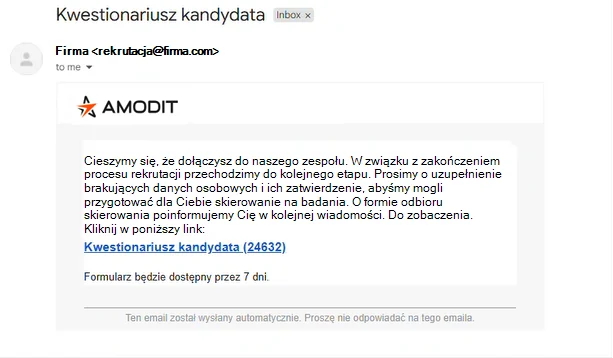
Email to a candidate with a link to a form for entering data before hiring
The candidate receives a link. An SMS code opens the form without creating an account. Test data.
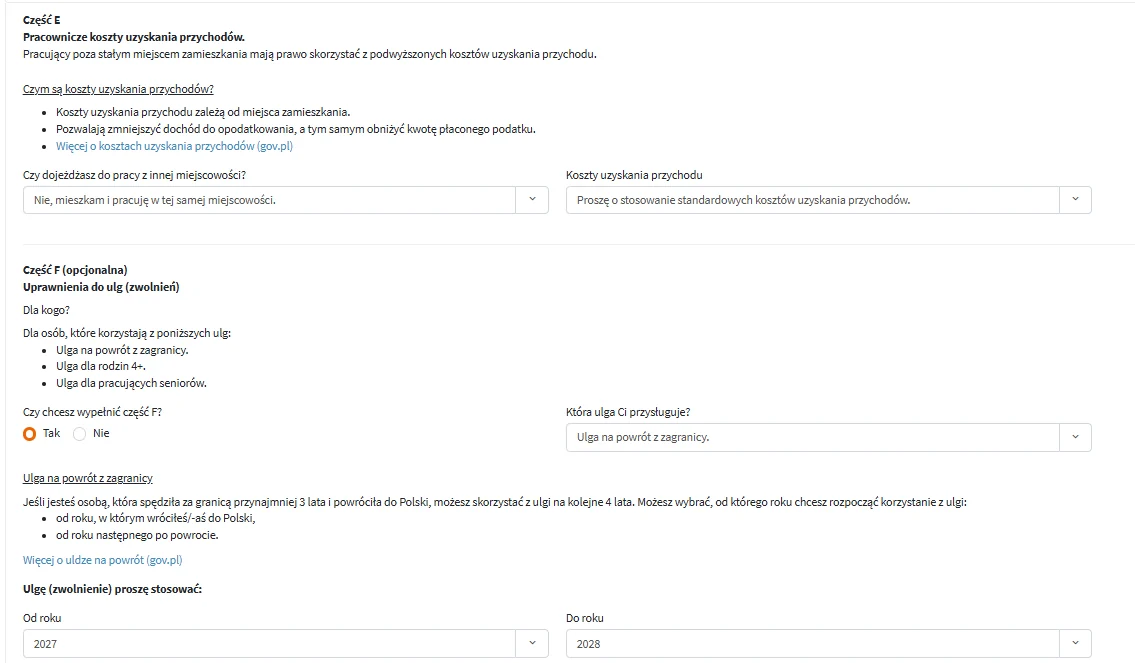
Section of an interactive personal questionnaire explaining tax-deductible expenses and eligibility for tax relief
The form explains before the candidate needs to ask. Plain-language guidance for the PIT-2 tax form and ZUS (Social Insurance Institution). Test data.
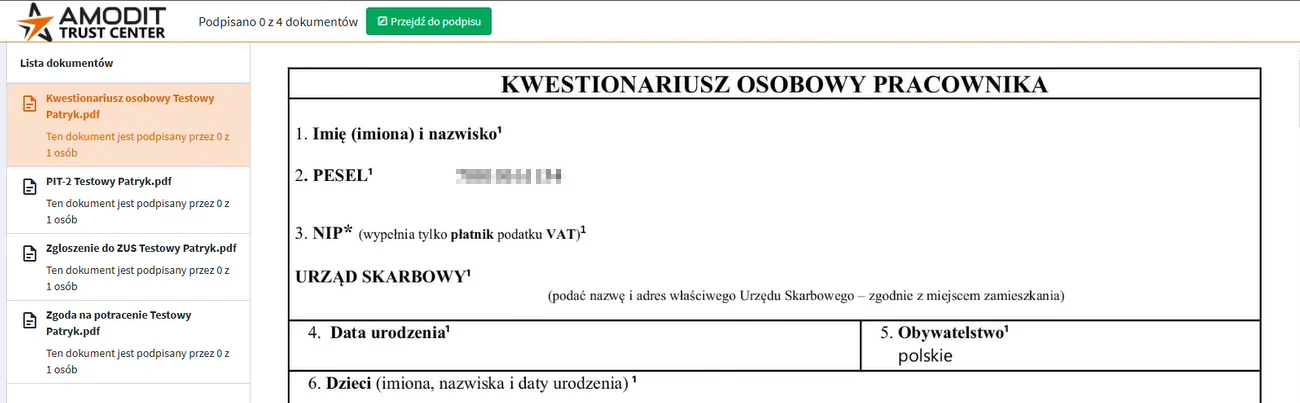
List of four documents for signature in AMODIT TrustCenter: personal questionnaire, PIT-2 tax form, ZUS registration, and consent to a payroll deduction
Documents in one package. Electronic signature without an office visit. Test data.

AI and OCR prepare data, and a person reviews and approves it. The solution reads a document or identifies information from approved knowledge, but decisions about hiring, employment terms, documentation, and the employee's situation remain with an authorized person. We use existing models and configure them for the client's process—we do not train LLM or OCR models. We process AI data in a controlled environment in EU regions; the models are not trained on client data, ensuring compliance with GDPR and the AI Act.

eTeczka and access

Complete personnel files without exposing data to every process participant

The employee record connects documents to the right employee. Personnel file sections A–E, categories, metadata, chronological numbering, versioning, and duplicate control organize documentation from receipt through archiving or deletion after the retention period.

Organizational roles and multi-level permissions restrict data visibility. A history of changes, signatures, and access supports control, while retention, disposal, and export are part of a designed process aligned with the organization's policies.

The employee portal closes the document loop

  • forms and documents available to the appropriate person;
  • PIT tax forms, RMUA statements, and payslips with encrypted distribution;
  • document signature and storage of the signed file in eTeczka;
  • notifications about missing items, tasks, and deadlines;
  • employee and manager access aligned with their roles.
How it works

From hiring to the documentation archive

We adapt the process to the organization's structure and rules. What remains consistent is one path for data, documents, and tasks throughout the employment lifecycle.

Path From hiring to the employee documentation archive

This universal path shows the stages of the employment lifecycle. We configure roles, documents, deadlines, and exceptions for the company's processes.

  1. Employment and data

    The candidate and HR enter data once, and the process supplies the employee record and documents.

    • forms
    • employee record
    • employee data
  2. Onboarding and documents

    The contract, signatures, and tasks reach the right people before the first day of work.

    • contract
    • signatures
    • department tasks
  3. eTeczka

    Documents are organized, while completeness, duplicates, and deadlines are controlled.

    • sections A–E
    • completeness
    • deadlines
  4. Changes and reviews

    Amendments, position changes, objectives, and reviews move through assigned roles and approvals.

    • amendments
    • objectives
    • reviews
  5. Termination and archive

    Offboarding closes tasks and access, and documentation enters the appropriate retention path.

    • offboarding
    • retention
    • export
What we connect The HR process in the company's environment

AMODIT runs the case and records the accountability history, while integrations exchange data, documents, and statuses with the HR process environment.

Process + platform

AMODIT

Employment lifecycle, eTeczka, roles, and deadlines.

  • AMODIT TrustCenter
  • People and roles

    Flow: tasks, data, and decisions.
    • HR specialist
    • manager
    • employee
  • HR and payroll systems

    Flow: employee records, documents, and statuses.
    • SAP HR
    • TETA
    • Workday
    • enova365
    • Business Central
  • Signatures and documents

    Flow: documents and signature status.
    • electronic signature
    • seal
    • PDF and DOCX
  • Employee portal

    Flow: requests, documents, and notifications.
    • forms
    • PIT and RMUA
    • self-service
  • HR reporting and BI

    Flow: data for analysis.
    • process statuses
    • deadlines
    • HR trends
  • Archive and retention

    Flow: archiving and deletion.
    • XML metadata
    • PDF export
    • retention
More than workflow

Technology and services for HR

We use AMODIT and solutions built by Astrafox first. We then connect them to HR and payroll systems and services from other vendors operating in the organization's environment.

AMODIT

On Astrafox's own platform, we build HR processes, eTeczka, the employee portal, signatures, roles, deadlines, notifications, and the decision history.

Explore AMODIT →

AI and OCR under HR control

We read documents and provide approved knowledge at the appropriate process step. The user verifies the output before use.

Explore AI solutions →

Custom HR systems

We build applications for reviews, objectives, development, bonuses, and self-service when the organization's complex rules extend beyond the configuration of an off-the-shelf solution.

Explore Software & Integrations →

BI for HR

We connect employment, changes, absences, deadlines, and process statuses in reports with the appropriate level of aggregation and access control.

Explore Data & BI →

Cloud or on-premises

We run the solution in the Astrafox cloud, the client's cloud, or the client's infrastructure, with access control, backups, monitoring, and defined accountability.

Explore Cloud & Infrastructure →

HR and payroll systems and ERP

We connect the process to any HR and payroll system. We also implement and develop Comarch ERP Optima and Comarch HR; the ZWUA Documentation Agent remains a vendor feature.

Explore Comarch ERP Optima and Comarch HR →
HR reporting without automated employee assessment

A report should prompt a question about how work is organized, not automatically diagnose a specific employee. Shared definitions, the appropriate level of aggregation, and restricted access give the data the context it needs.

Employment and changes

Status and flows over time, with a clear definition of the period, population, and report audience.

Absence and planning

A view adapted to the user's role without excessive disclosure of individual-level data.

Turnover

Signals and comparisons identify areas for analysis. Correlation alone does not prove the cause of a departure.

Explore employee turnover analysis →
Integrations

The HR process works with the system that maintains employee data

We have connected HR and eTeczka processes to SAP HR and SAP HCM, TETA, Workday, enova365, Microsoft NAV and Business Central, Comarch ERP Optima and Comarch HR, and Microsoft AX. We also integrate other HR and payroll systems through their available interfaces.

The exchange covers employee records, organizational structure, forms, documents, metadata, working time, requests, signature statuses, and feedback. Active Directory, LDAP, Microsoft Entra, and SSO connect accounts, groups, and permissions.

Data moves between systems without re-entry

  • REST APIs and HR and ERP system interfaces;
  • staging tables and SQL views;
  • Excel, CSV, XML, PDF, and DOCX files;
  • SFTP, network resources, and secure email;
  • statuses, error handling, retries, and exchange history.
Explore systems integration → Explore Comarch ERP →
Typical scope

We connect employee documentation to processes across the employment lifecycle

The scope extends beyond a file repository. It includes roles, documents, signatures, data, integrations, exceptions, and accountability after launch.

Hiring and onboarding

Candidate data, the contract, examinations, signatures, and tasks for HR, the manager, IT, occupational health and safety, and administration.

eTeczka and employee records

Personnel file sections A–E, categories, metadata, numbering, versions, search, and completeness control.

Employee documents

PIT and PIT-2 tax forms, RMUA statements, payslips, statements, forms, and encrypted distribution.

Signatures in the process

Simple, advanced, and qualified signatures, seals, bulk signing, and storage of the document in the personnel file.

Changes and offboarding

Amendments, position, terms, subsequent contracts, termination, and settlement of access and equipment.

Reviews and development

Objectives, competencies, performance reviews, development conversations, training, appeals, and action plans.

Bonuses and reports

Bonus models, approvals, confidentiality, decision history, and reports for the employee, manager, and HR.

Digitization and retention

Scanning, quality enhancement, OCR, indexing, migration, export, archiving, disposal, and deletion after the retention period.

Onboarding and offboarding also trigger administrative requests, signatures, purchases of equipment and services, and invoice workflows for benefits, training, or occupational medicine.

Explore employee administration and service → Explore electronic signatures → Explore contracts and legal →
Experience catalog

What we work with in HR and eTeczka projects

This catalog presents the processes, documents, integrations, controls, and reports we connect in an organization's environment. We select the scope for the organization's process, systems, and needs.

Systems and integrationsAMODIT, SAP HR, SAP HCM, and SAP Employee Central, TETA, Workday, enova365 and more
  • AMODIT
  • SAP HR, SAP HCM, and SAP Employee Central
  • TETA
  • Workday
  • enova365
  • Microsoft Dynamics NAV, Business Central, and AX
  • Comarch ERP Optima and Comarch HR
  • Comarch ERP XL
  • SAP MM
  • client HR and payroll systems
  • employee, manager, and employee self-service portals
  • time and attendance systems
  • AMODIT TrustCenter
  • SimplySign
  • SIGNIUS
  • SignHub
  • Office 365 and SharePoint
  • Active Directory, LDAP, Microsoft Entra, SSO, and MFA
  • Google Workspace, Google Drive, and Google Sheets
  • EasyRedmine
  • occupational health and safety systems and ServiceDesk
  • PUE ZUS (Social Insurance Institution online portal)
  • email and SMS gateways
  • REST APIs
  • staging tables and SQL views
  • Excel and CSV imports and exports
  • PDF, DOCX, and XML metadata
  • SFTP and VPN tunnels
  • network folders and resources
  • Cloud Agent
  • OCR, indexing, scanners, multifunction devices, barcodes, and scan splitting
HR documents and areaselectronic personnel files, employee records, and personnel file sections A–E, documents of current and former employees, employment contracts, amendments, and changes to employment terms, civil-law contracts, invoices, and B2B documents, terminations and certificates of employment and more
  • electronic personnel files, employee records, and personnel file sections A–E
  • documents of current and former employees
  • employment contracts, amendments, and changes to employment terms
  • civil-law contracts, invoices, and B2B documents
  • terminations and certificates of employment
  • employment requests, promotions, and recruitment requisitions
  • candidate and employee forms and personal questionnaires
  • job descriptions and organizational data
  • referrals, examinations, and occupational medicine certificates
  • occupational health and safety training and records
  • professional licenses, certificates, and qualification credentials
  • PIT and PIT-2 tax forms, RMUA statements, and payslips
  • pay records and bonus documentation
  • family member registrations and ZUS ZCNA forms
  • bank account and payment method data
  • Employee Capital Plan (PPK) declarations and requests
  • social benefits, allowances, medical care, and other benefits
  • employee equipment
  • leave and parental entitlement documents transferred to personnel files
  • working time, attendance, overtime, and absence records
  • objectives and their completion, performance reviews, and competency sheets
  • development conversations and individual development plans
  • training requests, plans, and documentation
  • review appeals
  • statements and information obligations
  • temporary documents
  • document and form templates
  • scans of paper personnel files
  • electronically signed files
  • PDF archives with XML metadata
Process scenariosrecruitment, employment request, and remote data collection through a link and SMS code, completeness checks and data validation, generating a contract and document package from templates, approval of employment terms, simple, advanced, and qualified signatures and the employer seal and more
  • recruitment, employment request, and remote data collection through a link and SMS code
  • completeness checks and data validation
  • generating a contract and document package from templates
  • approval of employment terms
  • simple, advanced, and qualified signatures and the employer seal
  • bulk signing, status control, and signature verification
  • saving signed documents to eTeczka
  • onboarding with tasks for HR, IT, occupational health and safety, and administration, including workstation preparation
  • creating employee records, eTeczka files, personnel file sections, and categories
  • metadata, indexing, numbering, and document versioning
  • duplicate detection and personnel file completeness checks
  • validity control and notifications about missing documents
  • changes to position, terms, and working hours, amendments, and subsequent contracts
  • changes to personal and bank account data
  • employee and manager self-service
  • encrypted distribution of PIT tax forms, RMUA statements, and payslips
  • bulk document generation and case initiation from an Excel file
  • registering documents from email and network resources
  • records digitization: transportation, test scanning, OCR, and indexing
  • personnel file migration and document and metadata imports
  • personnel file, document, and metadata exports
  • retention, archiving, disposal, and removal of disciplinary records after the required period
  • employment termination, cross-department offboarding, and personnel file archiving
  • access removal and equipment settlement
  • exchanging data, documents, and statuses with the HR system
  • handling integration errors, retries, and feedback
  • performance reviews, objectives, competencies, and development conversations
  • training plans and development activity monitoring
  • bonus processes for different employee groups
  • appeals, corrections, and case reopening
  • substitutions and delegation of authority
  • separate rules for companies, branches, and employee groups
  • multi-level permissions and a history of changes, decisions, and access
  • forms and processes in multiple languages
  • mobile support for the employee process
Controls, reports, and analyticspersonnel file completeness, missing items, and document expiration dates, employment status and the current process stage, approval, signature, and change history, active, inactive, and scheduled-for-deletion documents, expiring examinations and training and more
  • personnel file completeness, missing items, and document expiration dates
  • employment status and the current process stage
  • approval, signature, and change history
  • active, inactive, and scheduled-for-deletion documents
  • expiring examinations and training
  • onboarding and offboarding status
  • tasks by person, department, and deadline
  • signed, rejected, and expired documents
  • import, export, and integration statuses
  • employment data and organizational changes
  • working time, attendance, absences, and timesheets
  • pay reports
  • review progress and results, objectives, and competencies
  • team competency maps
  • completion of development and training activities
  • bonus process status
  • reports for employees, managers, HR, and administrators
  • operational and management reports
  • reports generated in the background
  • digitization statistics: numbers of documents, pages, and personnel files
  • exports to Excel, CSV, and PDF
  • BI dashboards for HR
  • employment, absence, and turnover trends in the context of team size
Scale and environmentsimplementations in more than 40 organizations, projects since 2012, more than 100,000 electronic personnel files in our implementations, more than 40,000 eTeczka files in one organization, migrations covering approximately 3.8 million documents and more
  • implementations in more than 40 organizations
  • projects since 2012
  • more than 100,000 electronic personnel files in our implementations
  • more than 40,000 eTeczka files in one organization
  • migrations covering approximately 3.8 million documents
  • packages of up to 200,000 documents for signature
  • multi-company, multi-branch, and international groups
  • Astrafox cloud, client cloud, and on-premises installations
  • SLA-based support and development after launch
Scale and experience

We have implemented digital HR services and eTeczka in more than 40 organizations

Our implementations cover more than 100,000 electronic personnel files. The largest scope includes more than 40,000 eTeczka files in one organization; we have also migrated approximately 3.8 million documents and prepared packages of up to 200,000 documents for signature. Clients in this area include LPP, Adecco, Polpharma, Holcim, Currenda, Grupa Pracuj, and Rossmann.


Why Astrafox

  • More than 100,000 electronic personnel files in our implementations demonstrate our large-scale experience.
  • A named team leads the migration, documents, signatures, and permissions and provides SLA-based support after launch.
  • When a project requires a broader scope, we connect eTeczka to SAP HR/HCM, TETA, Workday, enova365, Comarch HR, and other HR and payroll systems.
Why Astrafox →
LPP
Adecco
Polpharma
Holcim
Currenda
Grupa Pracuj
Rossmann
Selected HR implementations and organizational contexts

Gi Group Holding

Standardizing HR processes after acquisitions, integrating different systems, and developing the solution after launch.

View case study →

Polpharma

eTeczka, employee documentation, signature digitization, and integrations described in a public case study.

View case study →

Adecco

Centralized tasks, backup coverage, and access to employee documentation described on the AMODIT clients page.

View AMODIT clients →

We adapt the project to the company's structure, locations, and roles: from groups formed through acquisitions, through healthcare and pharmaceuticals, to transportation, logistics, and technology organizations.

Implementation and maintenance

The project covers the process, migration, integrations, and accountability after launch

We run the solution in the Astrafox cloud, the client's cloud, or the client's own infrastructure. The architecture follows the organization's security rules, data location, integrations, and operating model.

Analysis and design

We organize roles, documents, personnel file sections, exceptions, permissions, retention, source data, integrations, and test scenarios.

Migration, testing, and training

We prepare the import or digitization, environments, user testing, a pilot, guidance, and training for HR, administrators, and IT.

SLA-based support and development

We provide maintenance, updates, error handling, integration monitoring, and process development following organizational or legal changes.

Explore SLA-based support →
What determines the scope and cost

Roles, steps, and exceptions

HR, managers, candidates, IT, occupational health and safety, administration, and process variants.

Documents and signatures

Forms, templates, eTeczka, signature types, and the required approval workflow.

HR integrations

The HR and payroll system, ERP, AMODIT, email, identity, and reporting.

Data migration

History scope, data quality, mapping, and the method for secure transfer.

Security and testing

Access to employee data, compliance requirements, and acceptance scenarios.

Licenses and maintenance

Selected products, number of users, and accountability after launch.

Related knowledge

How to prepare hiring and eTeczka for automation

These resources show roles, the candidate journey, and document completeness controls in a real HR process.

Hiring across six roles

How to connect the recruiter, candidate, HR, occupational health and safety, authorized representative, and manager without re-entering data.

Read the article →

A candidate without an HR office visit

How to design account-free access, forms with guidance, online signatures, and a secure candidate journey.

Read the article →

Eight completeness gates

How to check data, examinations, the contract, signatures, and storage in eTeczka at successive stages, not only at the end.

Read the article →

This page shows how we implement and integrate the solution in the company's environment. A detailed description of HR and electronic personnel documentation features is available on the product website.

HR features in AMODIT →

The scale we support in HR

For a large energy group, we have developed and maintained a family of HR systems for years: employee self-service, electronic personnel files, development conversations, and management objectives. In the largest implementations, an HR self-service system handles up to 1 million requests per year and 20,000+ users.

View case study →
HR systems built by Astrafox

HR · Energy

HR systems for a large energy group

Challenge
Companies within the group handled HR processes in different ways, using paper documents, manual handoffs, and separate registers. Request and user volumes were growing, while every organizational change required rapid adaptation.
After implementation
Shared systems serve employees and HR teams across the group. The HR self-service system processes up to 1 million requests a year for 20,000+ users.
View case study →

HR · Large organizations

HR platform integrated with SAP

Challenge
Paper forms, emails, and manual data exchange made it difficult to handle multiple employee processes.
After implementation
One configurable platform manages requests and synchronizes approved data with SAP.
View case study →

Legal & Compliance · Multiple industries

Secure whistleblower reporting channel

Challenge
Email and phone calls did not provide anonymous two-way communication, structured data, or control over sensitive files.
After implementation
An encrypted channel manages the report, dialogue, and case status, while the data flows into the investigation management system.
View case study →

HR · Multiple industries

Bonus process management system

Challenge
Multi-stage bonus decisions required consistent criteria, confidentiality, and alignment with the organizational structure.
After implementation
The system organizes goal assessment, approvals, and decision history while maintaining access control.
View case study →

HR · Multiple industries

Employee development planning system

Challenge
Competency, goal, and career decisions were difficult to manage and monitor in one process.
After implementation
The employee, manager, and HR work with one development plan under controlled data access.
View case study →

HR · Large organizations

Employee performance review system

Challenge
Paper forms, complex reporting relationships, and manual deadline tracking made employee reviews difficult to manage.
After implementation
The system automates stages, assignments, and reminders and records results and appeals with a complete change history.
View case study →
AMODIT

Finance & Controlling · Manufacturing

Manufacturing ERP, e-invoicing, HR, and kiosks

Challenge
The manufacturing company needed consistent ERP support, an organized invoice and HR document workflow, and convenient login for employees using shared workstations.
After implementation
ERP, invoices, and HR documents operate in one environment: KSeF invoices are routed without manual data extraction, while employees at shared workstations sign in with a card and PIN.
View case study →
See how we implement process automation →
FAQ

Frequently asked questions about HR and electronic personnel files

Do we need to replace our current HR and payroll system?

No. We establish the role of the source system and connect it to the process, eTeczka, signatures, portal, and reporting. We integrate solutions with SAP HR and SAP HCM, TETA, Workday, enova365, NAV and Business Central, Comarch ERP Optima and Comarch HR, and other systems that provide the required interface.

What do electronic personnel files include?

The scope covers employee records, personnel file sections A–E, document categories, metadata, numbering, versions, completeness and duplicate controls, deadlines, permissions, retention, archiving, and document exports with metadata. The project defines the documents and rules appropriate for the organization.

Do you digitize paper personnel files?

Yes. The scope covers secure transfer of the records, test scanning, quality enhancement, indexing by documentation section, PDF export with XML metadata, import into eTeczka, and reconstruction and return of the paper documentation.

Do signed documents go to eTeczka automatically?

Yes. The process prepares documents, routes them for signature, controls the status, and stores signed files in the appropriate employee record. We support simple, advanced, and qualified signatures, seals, and bulk signing.

Can we start with one HR process?

Yes. A good starting point is a process with a clear owner, repeatable steps, and a visible problem: data re-entry, missing status, or unhandled exceptions.

How do you control access to employee data?

Visibility follows the role, organizational unit, process stage, and permissions for the specific data scope. We configure authentication, SSO, groups, change history, and employee, manager, HR, and administrator access in line with the organization's policies.

How do you protect data in HR reports?

We establish the purpose of the analysis, audience, aggregation level, measure definitions, and access rules. The report presents signals and context for assessment by an authorized person; it does not automatically diagnose a specific employee.

Does the solution run in the cloud and on-premises?

Yes. We run it in the Astrafox cloud, the client's cloud, or the client's infrastructure. The project defines data location, environments, access, backups, monitoring, integrations, and maintenance accountability. After launch, we provide SLA-based support and development.

What scale of electronic personnel files does Astrafox support?

We support 100,000 eTeczka files. We connect employee documentation to HR processes, signatures, portals, and HR and payroll systems and provide support for the entire solution after launch.

Start with the document or task that gets lost between HR and other departments today

Describe the process, employee documentation, and HR systems. We will organize the scope of eTeczka, integrations, migration, and accountability.

Describe your challenge