Choose a starting point
Any ERP or accounting system
KSeF Connector handles communication between the source system and KSeF: document exchange, validation, statuses, and confirmations.
Invoice workflow and repository
We connect KSeF Connector to AMODIT so the team can work with documents, permissions, and invoice coding and approval processes.
Comarch ERP XL
We review the features available in the Comarch ERP XL environment and select the required scope of integration with KSeF Connector for companies operating in Poland.
Multiple systems or companies
We design a solution connected to one integration layer, with separate entity settings and authentication.
Key capabilities
Multiple ERP systems and companies
One component integrates ERP or accounting systems used by multiple entities, with separate settings and authentication.
Sales and purchasing
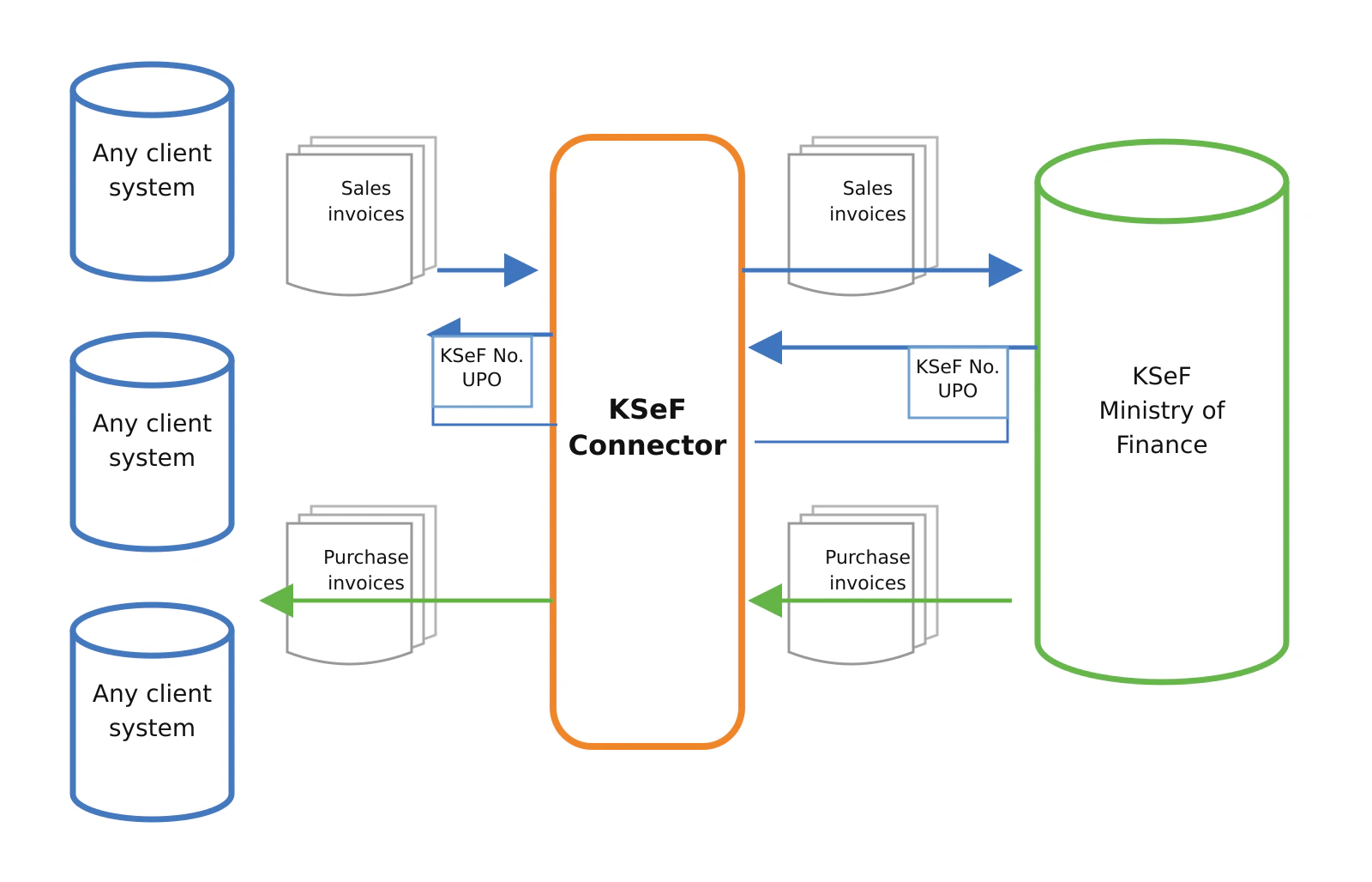
The solution sends sales invoices, retrieves purchase invoices, and transfers them to connected systems.
Workflow and approval
The AMODIT extension provides a document repository, permissions, and invoice coding and approval processes.
Error monitoring and accountability
Statuses, official confirmations of receipt, logs, and notifications provide control over the exchange and route issues to administrators.
The ready-made component gives an ERP or accounting system one API. The integration layer handles communication with KSeF, document validation, statuses, and confirmations.
Challenge: complex communication with KSeF
Each source system has its own data model and method for handling documents. Exchanging data with KSeF requires sending and retrieving invoices, tracking statuses, and handling external-system downtime.
A structural error or missing required data can stop a document. Building the entire communication layer separately for each system lengthens the project and complicates subsequent maintenance.
Solution: one component for an ERP or accounting system
Astrafox has developed a component that handles technical communication with KSeF. The source system sends and receives data through a stable API.
KSeF Connector operates as an automated integration service. We extend it with an AMODIT document repository in which the team works with invoices, permissions, and document workflows.
If the company uses Comarch ERP XL, KSeF Connector can still serve as the common integration layer. An additional description of invoice and official-confirmation handling in the Comarch ERP XL environment also explains features and processes available directly around that system.
Outcome: integration without building the entire layer from scratch
The team responsible for the ERP or accounting system uses one interface. Validation identifies problems before submission, while background jobs handle routine status checks and document retrieval. Logs and statistics make it easier to monitor and diagnose issues.
The multi-entity architecture supports both a single organization and an environment serving several companies.
Benefits for the organization
- One component integrates multiple ERP systems used by multiple companies.
- Monitoring detects a missing response from a system involved in the process and notifies administrators.
- Additional validation before submission identifies errors before a document reaches KSeF.
- Shared handling of statuses, official confirmations of receipt, and errors provides oversight of invoice exchange in a distributed environment.
Implementation process
The offer combines ready-made KSeF Connector features with an implementation project tailored to the client’s systems and process.
- Pre-implementation analysis. We define the technical and business requirements, validations, invoice-submission method, and document workflow. We also determine the integrations and data-exchange channels: SOAP or REST API, database view, files shared on a drive, or file import. We specify data formats, including XML, JSON, Excel, or an agreed text file, and return communication covering the submission status, invoice acceptance date, KSeF number, and official confirmation of receipt. The outcome is an analysis document approved by both parties.
- Solution architecture. We prepare an architecture diagram for the test and production environments, a recommended configuration, and solution sizing.
- Installation and configuration. We configure KSeF Connector to send and receive invoices in the client’s context. If the ERP runs on company servers, we install the CloudAgent component to provide communication without opening external access to the ERP.
- Integration with client systems. We connect KSeF Connector to the agreed financial, accounting, and workflow systems in line with the analysis document.
- Field mapping. The built-in mapper assigns data from the source format to the appropriate fields in the KSeF format based on the approved analysis.
- Testing in the client environment. We connect the solution to the KSeF test environment and verify the configuration, integrations, return-information flow, and field mapping before production launch.
- Production launch. After testing is complete, we switch the application to the KSeF production environment and start live document exchange.
- Final documentation. After implementation, we provide updated solution documentation.
- Implementation training. On request, we conduct training for the selected group of users and administrators covered by the implementation.
Technical scope
Integration and communication with KSeF
- connection to any ERP or workflow system,
- mapping fields from the client’s system format to the KSeF format,
- opening and maintaining sessions and handling authentication and certificates,
- manual, on-demand and automated retrieval of electronic purchase invoices,
- manual and automated sending and retrieval of electronic sales invoices,
- transferring retrieved documents to connected ERP and workflow systems,
- sending multiple invoices at once,
- technical and business validation before submitting a document,
- detection of duplicate invoices,
- retrieval of statuses, the KSeF reference number, invoice date, and official confirmation of receipt,
- periodic status checks and document retrieval,
- an emergency mode for KSeF downtime,
- monitoring the availability of systems involved in the process and notifying client and Astrafox administrators of communication problems,
- notifications about errors in transmitted invoices,
- support for multiple entities with separate parameters and certificates.
AMODIT document repository (extension)
- retrieval and storage of official confirmations of receipt,
- generation of PDFs with the KSeF number, date, and QR codes,
- visualization of sales and purchase invoices in Polish and English,
- email notifications about new invoices,
- management of invoice access permissions,
- assignment of invoices to specific people based on document parameters, such as the contractor’s tax identification number,
- invoice process and workflow support in AMODIT,
- reports, summaries, statistics, logs, and an operations register.
ERP on company servers: the CloudAgent component. When the ERP system runs in the company’s infrastructure (on-premises) and the company does not want to open external connections to its ERP, KSeF Connector connects through the CloudAgent component. CloudAgent provides a connection between KSeF Connector and the ERP system without opening external access to the ERP.
Communication methods and data-exchange formats
We select the communication channel based on the characteristics of the client’s system. KSeF Connector supports:
- SOAP Web Services and REST APIs,
- database views,
- files shared on a drive,
- file import.
Supported data formats include XML, JSON, Excel files, and text files in an agreed format.
The component has a cross-platform .NET architecture and works with various database engines. It separates the KSeF client, data layer, recurring-job mechanism, and user interface. The API comes with full documentation, and the solution includes authorization, operation logging, and service health-control mechanisms.
Invoice flow between systems
We develop KSeF Connector with a process for handling known vulnerabilities and security updates. See how we relate the product to KSeF and Cyber Resilience Act (CRA) requirements.
Frequently asked questions
Does KSeF Connector replace the ERP system?
No. It is an integration layer between an existing ERP or accounting system and KSeF.
Does the component support multiple companies?
Yes. Each entity has separate settings, authentication, and certificates.
Do we need to open external access to the ERP?
No. If the ERP runs on company servers, the CloudAgent component provides the connection to KSeF Connector without opening external connections to the ERP system.
Does the system store confirmations?
Yes. It retrieves and stores official confirmations of receipt and document-status information.