A purchase invoice arrives in a shared inbox. Accounting forwards it to the person who placed the order, that person asks their manager, and the expense coding is prepared in a spreadsheet. As the payment deadline approaches, the search begins for the latest document version and the answer to one question: who is actually supposed to approve it?
This is not merely an accounting problem. Budget owners, purchasing, managers, finance, and IT all participate in the workflow. KSeF (Poland’s National e-Invoicing System) organizes the formal issuing and receipt of structured invoices, but it does not replace company decisions: confirmation of delivery, assignment of a cost center, budget control, invoice coding, and expense approval. These tasks need to be connected in one process.
Below we show a purchase invoice workflow before and after an AMODIT implementation—from document receipt to data transfer into the ERP.
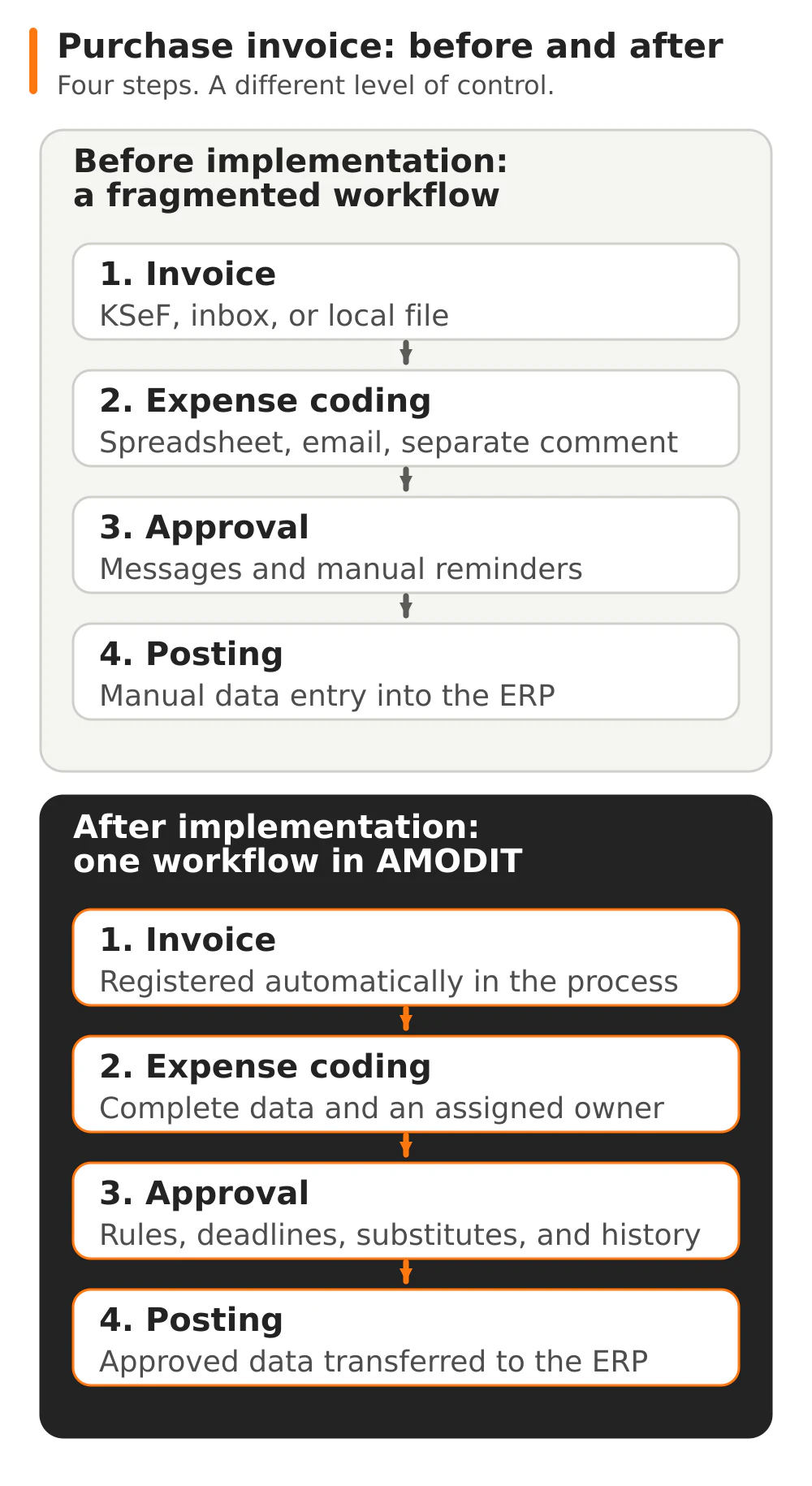
Before implementation: the invoice circulates while the deadline approaches
A common problem starts innocently. A vendor sends a PDF to an employee or the accounting inbox. The invoice from KSeF is already available, but the internal workflow does not begin until someone manually downloads, saves, and forwards it.
Accounting searches for the expense owner
An invoice does not always show who requested the purchase or which budget should cover it. An accountant searches email, asks purchasing, or sends the document to several people. Responsibility is not assigned to the case, so every absence stops the next step.
Coding is prepared outside the document
The cost center, project, budget item, purchase order number, and proposed general ledger account go into a spreadsheet, message, or comment in a separate system. A change to one field creates another version. Accounting must later match the coding to the correct invoice and re-enter the data in the ERP.
Approval depends on participants’ memory
An employee does not know whether the invoice should be approved by the department manager, budget owner, or CFO. An amount-based rule exists as team knowledge rather than a process mechanism. There is no single task deadline, automatic reminder, or substitute during leave.
Access is too broad or arbitrary
A message can be forwarded, a spreadsheet shared with the wrong group, and an attachment stored locally. At the same time, the decision-maker does not always have access to the complete set: invoice, purchase order, contract, acceptance record, and previous comments.
Risk grows with every document handoff
A fragmented workflow does more than consume time. It creates risks that surface during month-end close, an audit, or a vendor dispute:
- late payment, because the invoice is waiting in one person’s inbox while the deadline continues to run;
- no decision trail, when approval was given in a conversation, chat, or message not linked to the case;
- coding or posting error, when data is re-entered between a spreadsheet, email, and the ERP;
- an approval rule is skipped, such as an additional approval above an amount threshold;
- uncontrolled access, when a financial document and its attachments circulate outside a role and permission system;
- poor process visibility, because finance knows the status of individual cases but cannot see all pending, overdue, and rejected documents in one place.
Retrieving an invoice from KSeF alone does not resolve these issues. KSeF confirms the formal existence of the document, while substantive review and approval remain the company’s responsibility. The division of roles between KSeF, workflow, and the ERP is explained in more detail in the guide to KSeF and ERP integration.
After implementation: one case guides the invoice to the ERP
After AMODIT is implemented, the invoice is no longer an attachment forwarded between inboxes. It becomes a process case with an owner, data, attachments, deadlines, and history. AMODIT manages the workflow, KSeF or email provides the document, and the ERP remains the financial and accounting system.
1. The invoice enters the process automatically
A document from KSeF is retrieved by the integration layer and registered in the workflow. An invoice received outside KSeF opens a case from an incoming message. The process therefore begins immediately in a controlled location, regardless of the intake channel.
For KSeF, we use structured invoice data. When the source is a PDF or scan, AMODIT AI OCR reads and classifies document data and completes form fields. AI prepares the result, while the user reviews and approves the extracted information before the process continues.
2. Expense coding has a defined scope
The business owner receives a task with the invoice and supporting documents. They complete the required data, such as the cost center, project, budget, purchase order, and business description. The form enforces completeness, so the case cannot proceed without the information required for approval and posting.
Invoice coding uses document, vendor, and organization rule data. An exception does not disappear in correspondence—it goes to the designated role for resolution.
3. Rules select the correct approvers
The path follows established conditions: amount, cost center, company, expense type, or budget ownership. A higher amount triggers an additional approval level, while an expense assigned to a specific cost center goes to its owner.
An absence does not block the document. Substitution rules assign tasks to the appropriate person for a defined period while preserving case permissions. In a more complex model, substitutions can be separated by process.
4. Deadlines and reminders are part of the workflow
Every task has a responsible person and deadline. Notifications remind users about pending decisions, while finance can see the document’s current stage. Instead of asking participants for an update, the team checks the status in the case.
5. Every decision remains with the invoice
Approval, rejection, comments, data supplements, and transfers to the next stage create a process history. Documents related to the invoice—purchase order, contract, acceptance record, or explanatory correspondence—also remain in one place. Access follows the user’s role and the case stage rather than a message recipient list.
6. Approved data enters the ERP
Once approval is complete, the integration sends the agreed data to the financial and accounting system. We integrate AMODIT with any ERP; Comarch ERP XL is one of the supported environments. The ERP handles recording and posting, while AMODIT retains the process context and decision history.
If a company needs only a connection between KSeF and the ERP, without an extensive workflow, KSeF Connector is the appropriate solution. When coding, approval, substitutions, and access control are required, AMODIT is the foundation of the solution. Comarch environment functions are described separately, as supporting information, on the page about the purchase invoice workflow with KSeF and ERP XL.
Invoices still wait in email or spreadsheets? Show us the current path and decision rules. Discuss your invoice workflow in AMODIT →
Reporting shows where the process stops
An electronic workflow provides data that an email inbox cannot: case stage, waiting time, responsible person, decision outcome, and rejection reason. AMODIT reports analyze process cases, and for broader requirements we connect process data with BI reporting.
Finance can see documents awaiting coding or approval, exceptions requiring action, and the workload at each stage. This view supports more than day-to-day control. It also shows which rules, roles, or integrations need improvement.
What does an AMODIT invoice workflow implementation involve?
We do not begin by replicating every email and spreadsheet. First, we determine which decisions are necessary, who owns them, and which data must ultimately reach the ERP.
- Process analysis. We collect intake channels, invoice types, roles, amount thresholds, cost centers, budgets, substitutions, exceptions, and accounting requirements.
- Workflow and permission design. We define the form, approval paths, deadlines, reminders, data access, and handling of rejection or correction.
- AMODIT configuration. We build the process, rules, tasks, and reports. AI functions are enabled where a document requires extraction or classification.
- Integrations. We connect the workflow to KSeF, email, and the ERP. We define the source of each field and return communication for statuses and errors.
- Testing and go-live. Finance and process participants test standard invoices, high amounts, absences, missing data, rejections, and documents outside KSeF. After launch, we monitor the process and expand subsequent rules.
The scope and sequence depend on the number of companies, systems in use, and complexity of the approval policy. We therefore set the implementation schedule only after analysis, without promising one universal timeline for every organization.
Checklist: is your workflow ready for automation?
- Does every invoice intake channel—KSeF, email, and documents outside KSeF—have a defined registration method?
- Is it clear who codes the expense and which fields are required: cost center, project, budget, purchase order, account, or other data?
- Are approval rules documented, including amount thresholds, cost center owners, and additional approvals?
- Has a substitute been designated for every role during absences?
- Are task deadlines, reminders, and an escalation method defined?
- Does access to the invoice and attachments follow the role, company, and process stage?
- Is it clear which data should enter the ERP and at which point?
- Are exceptions covered: no purchase order, amount discrepancy, duplicate, rejection, correction, and integration error?
If several questions do not have one answer, this does not mean the company is unprepared. Defining these answers is precisely the scope of the first analysis stage. The guide on how to choose a document workflow and process automation system also helps select the right solution category.
FAQ: purchase invoice approval in AMODIT
Does KSeF replace invoice workflow and approval?
No. KSeF provides the structured invoice and its formal status. It does not verify the expense against a purchase order or budget, identify the cost center owner, or manage the company’s approval path. A workflow handles these tasks.
Must every invoice follow the same path?
No. Rules route the document according to process data, including amount, cost center, company, and expense type. Exceptions go to the designated person instead of passing automatically without control.
Does AMODIT integrate only with Comarch ERP XL?
No. We integrate AMODIT with any ERP. Comarch ERP XL is one example; the data exchange method follows the client’s architecture and process scope.
Where does AI support the invoice workflow?
AI OCR reads and classifies data from documents that require recognition, such as PDFs or scans. The user verifies the result before the case continues. For an invoice from KSeF, the process uses structured data, so we do not present OCR as a required step.
Does implementation require replacing the ERP?
No. AMODIT operates as a process layer connected to the existing financial and accounting system. The integration scope defines which data enters the ERP after approval and which statuses return to the workflow.