A good document workflow system manages an entire case from document receipt to the decision, preserves roles, deadlines, and history, and connects with the systems already in use. Select it based on the processes it must support today and develop later—not on a feature list alone or an impressive demonstration.
When is an ERP, Excel, or email enough, and when is workflow required?
A standard ERP module is enough when the process fits within one system, has few exceptions, and the vendor provides the required approvals, permissions, and reports. A separate platform should not be added merely to recreate a function that already works in the current solution.
Excel and email work for a straightforward, infrequent, or temporary workflow with few participants, a clearly identified owner, and no critical dependency on automatic reminders. They are a weak foundation, however, for a process that must be auditable, operate across many departments or companies, and handle documents that require access control.
A workflow system is required when a document passes through several roles, a decision depends on an amount or other data, substitutes and exceptions occur, deadlines must be managed, and the result must return to an ERP, HR system, or other application. Another warning sign is employees repeatedly asking for a status, searching for the current attachment version, or manually re-entering the same data across systems.
For example, an accountant receives an invoice, checks the order in the ERP, uses email to find the person responsible for the cost, and records the approval status in a spreadsheet. An accounting module alone does not always resolve the problem because the bottleneck lies in accountability, exceptions, and the flow of work between people. This is where a workflow platform and broader Process Automation should be considered.
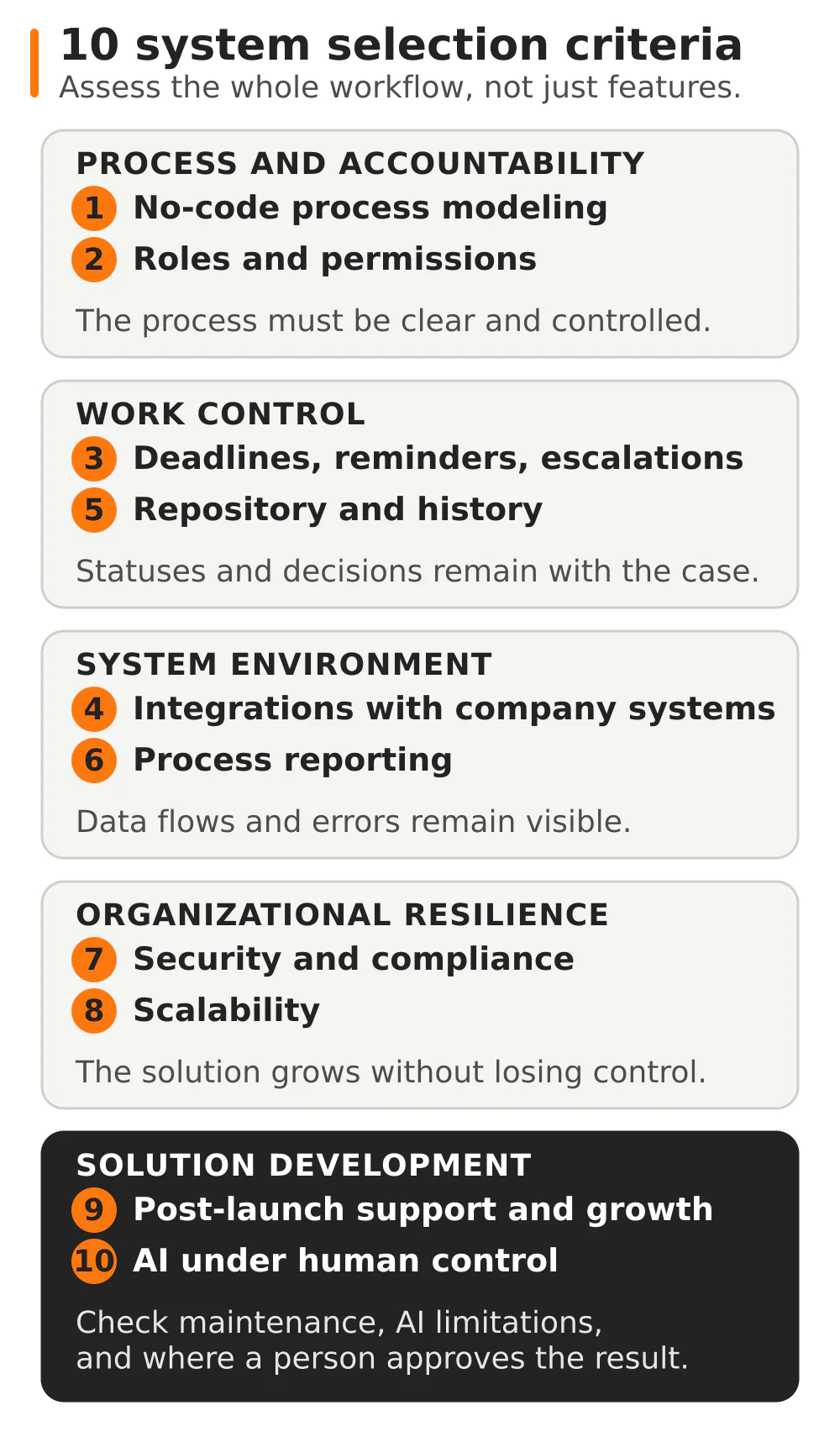
Ten criteria for selecting a system
1. No-code process modeling
Check whether the process owner can understand the diagram, forms, and rules without reading code. What matters is not only the first configuration but also a later change to an approval threshold, the addition of a role, or a new path. Ask the provider to modify the process live during the presentation.
2. Roles and permissions
The system should separate read, edit, approve, and administrative permissions. Evaluate its handling of groups, organizational structure, substitutes, and confidential documents. In a large company, directory integration also matters so an employee’s departure or job change does not require manual corrections in many places.
3. Deadlines, reminders, and escalations
Sending a notification alone is not enough. The system should identify the task owner, deadline, state after the deadline has passed, and person who receives the escalation. During the demonstration, test a process with an absent approver, a substitute, and a task that receives no response.
4. Integrations with the company’s environment
A list of logos does not explain how data exchange works. Ask about the integration direction, frequency, error handling, retries, and system of record. The typical scope includes ERP, Active Directory or Entra ID, email, office suites, electronic signatures, and domain systems. Comarch ERP XL and Comarch ERP Optima are examples of possible systems for companies operating in Poland; a workflow solution should not lock the company into these or any other ERP.
5. Document repository and history
A document should be linked to the case, version, comments, and decisions. Check search, metadata, versioning, retention, and the operation log: who added the file, what changed, and when it was approved. This is what separates a controlled workflow from a folder where everyone deposits attachments.
6. Process reporting
A report should answer operational questions: how many cases are waiting, at which stage, with whom, and for how long. Management needs trends and bottlenecks, while the process owner needs to move from the result to the cause. Also determine whether the data can be combined with corporate BI when the analysis must cover several systems.
7. Security and compliance
Request a description of encryption, authentication, backups, disaster recovery, logs, security testing, and vulnerability management. Check cloud and on-premises options, data location, and the ability to meet requirements from IT, the data protection officer, compliance, and purchasing. A general declaration of compliance does not replace documentation and answers about the specific implementation.
8. Scalability
Evaluate more than user count. Include the number of processes, documents, companies, language versions, and integrations. Ask how the solution behaves as load grows, how it separates entity data, and whether one process standard can develop with controlled exceptions for individual units.
9. Post-implementation support and development
A process changes along with the law, company structure, and source systems. Establish who diagnoses incidents, updates integrations, develops subsequent workflows, and documents changes. Compare the warranty, maintenance, and SLA scope, not merely help-desk availability.
10. AI in the process under human control
AI makes sense when it performs a specific task: interpreting a document, preparing a summary, proposing a classification, or creating draft material. The provider should explain the knowledge sources, permissions, recorded output, limitations, and subsequent path. AI recommends, and a person reviews and approves—especially when the output affects a contract, payment, employee data, or formal decision.
Do you already have a process list but do not know which criteria are critical? Describe the current workflow, roles, and systems. Discuss a document workflow in AMODIT →
Questions to ask a provider
This checklist covers 12 questions to ask before comparing proposals:
- During the presentation, will you configure part of our process instead of only showing a ready-made example?
- Which changes can a business administrator make, and which require the provider or a developer?
- How does the system handle roles, groups, substitutes, confidentiality, and access removal?
- What happens after a deadline is missed, and how does escalation work?
- How are the case history, file versions, comments, and decisions documented?
- How does the solution integrate with our ERP, user directory, email, and electronic signature service?
- How are integration errors detected, who receives the alert, and how is the operation retried?
- Which reports do users, the process owner, auditors, and management receive?
- What infrastructure, backup, recovery, and test-environment options are available?
- How will the solution handle additional companies, languages, processes, and higher document volumes?
- What do maintenance, SLA, process development, and post-launch documentation updates look like?
- How does AI use data, what are its limitations, and where does a person approve the result?
The answers should appear in the proposal, solution description, or contract appendix. This makes it possible to compare the actual scope of responsibility instead of differently interpreted sales phrases.
Common selection and implementation mistakes
- Implementing everything at once. The team tries to cover invoices, contracts, HR, purchasing, and correspondence simultaneously. The scope grows faster than its capacity for testing and decisions. Launch the first important process, confirm the standard, and then extend the platform.
- No process owner. The provider knows the system but cannot make the company’s decisions about roles, exceptions, and accountability. The business owner should resolve the rules and approve the test outcome.
- Recreating paper in the system. A digital form with the same unnecessary signatures is not automation. Before configuration, remove steps that add no value and determine which data the system will retrieve automatically.
- Selecting based on a demonstration of an ideal case. Duplicates, missing data, an absent person, and an integration outage expose the real risk. A demonstration should include at least one exception.
- Postponing integration and maintenance until the end. The process relies on data from other systems, so interfaces, monitoring, and accountability are designed with it—not after the forms have been accepted.
What does implementation look like step by step?
- Select the starting process. The company chooses a business-critical process with a controllable scope and an owner.
- Analyze the current path. The team describes roles, documents, decisions, exceptions, deadlines, systems, and problems that should not be transferred to the new solution.
- Design the process and integrations. The team defines forms, rules, permissions, data flows, reports, and acceptance criteria.
- Configure and test. The basic path works first, followed by exceptions, substitutes, integration errors, and permissions. Business users approve the result.
- Launch and hand over. The company receives documentation, administration instructions, the support model, and a rollback plan if a problem occurs.
- Develop in stages. After observing the first process, the team introduces corrections and launches subsequent workflows based on a shared standard.
Review Astrafox case studies not to find an identical company but to confirm whether the provider can connect processes, documents, systems, and maintenance.
How does AMODIT meet these criteria?
AMODIT is Astrafox’s own platform for process automation and electronic document workflow. Its visual tools make it possible to build processes and forms without advanced technical knowledge and then develop them as the organization changes. The platform combines workflow with a document repository, versioning, operation history, permissions, and reporting.
AMODIT integrates with ERP and financial and accounting systems, Active Directory and Entra ID directories, Office 365, Google services, and electronic signatures. Astrafox connects the platform with systems including SAP, Symfonia, enova365, TETA, Comarch ERP XL, and Comarch ERP Optima. For invoices, the scope can also cover KSeF (Poland’s National e-Invoicing System), approval workflow, and transfer of data to the ERP. Comarch is one element of the environment, not a prerequisite for using the platform.
AMODIT runs in the Astrafox cloud, on the client’s server, or in the client’s cloud environment. When evaluating security, the organization can verify communication encryption, backups, recovery, audits, penetration tests, and access management. After launch, Astrafox maintains the processes, develops subsequent workflows, and adapts integrations to changes in the company’s systems.
AI functions are embedded in the process. AMODIT Copilot helps users navigate the system, identifies priorities, and prepares reports on request. The AI agent performs tasks that require interpreting documents or information. AskAI and agent rules configure AI for a specific task, while the Model Context Protocol (MCP) provides a controlled connection between selected AI tools and data, workflows, or external tools. Scope, context, permissions, and the subsequent path are established for the given process; the output goes to the responsible person.
The full description of product functions and offering options is available on amodit.com. Astrafox.com explains how we translate company needs into a process, integrations, infrastructure, testing, launch, and post-implementation maintenance.
Example implementation scopes are described on the Purchasing, Requisitions, Orders, and Budgeting and Requests, Business Travel, and Administration pages. They show roles, exceptions, and integrations that are not visible in a general feature list.
FAQ
Does a document workflow system replace the ERP?
Usually not. The ERP remains the source of financial, warehouse, or HR data, while the workflow manages the case, roles, approvals, and exceptions. The integration transfers the process outcome to the appropriate system without manual re-entry.
Should implementation begin with invoice workflow?
Yes, if the process has a clear owner, a repeatable path, and measurable problems with coding, approval, or integration. This is not a universal rule. A contract, purchasing, or HR process can be a better starting point when it carries greater risk and the team is ready.
Can a workflow platform be developed without programmers?
In a low-code system, a process administrator can make many changes to forms, rules, and stages. Integrations, unusual logic, security, and architecture changes still require technical expertise. Establish this boundary using a specific example during selection.
How many processes should the implementation begin with?
The safest approach is to begin with one process or a coherent group of processes with the same owner and similar data. The first launch creates a standard for roles, integrations, testing, and maintenance that can be reused in subsequent workflows.
Want to check whether AMODIT fits your process? Describe the documents, roles, exceptions, and systems involved in the workflow. Describe your challenge →