KSeF (Poland’s National e-Invoicing System) turns an invoice into an element of a process between systems, rather than merely a document issued by accounting. Finance must control invoice accuracy, status, and subsequent workflow, while IT must provide secure authentication, integration continuity, error monitoring, and outage handling. A company’s readiness therefore depends on the entire flow: from the ERP, through KSeF, to approval and posting.
First determine where the problem begins
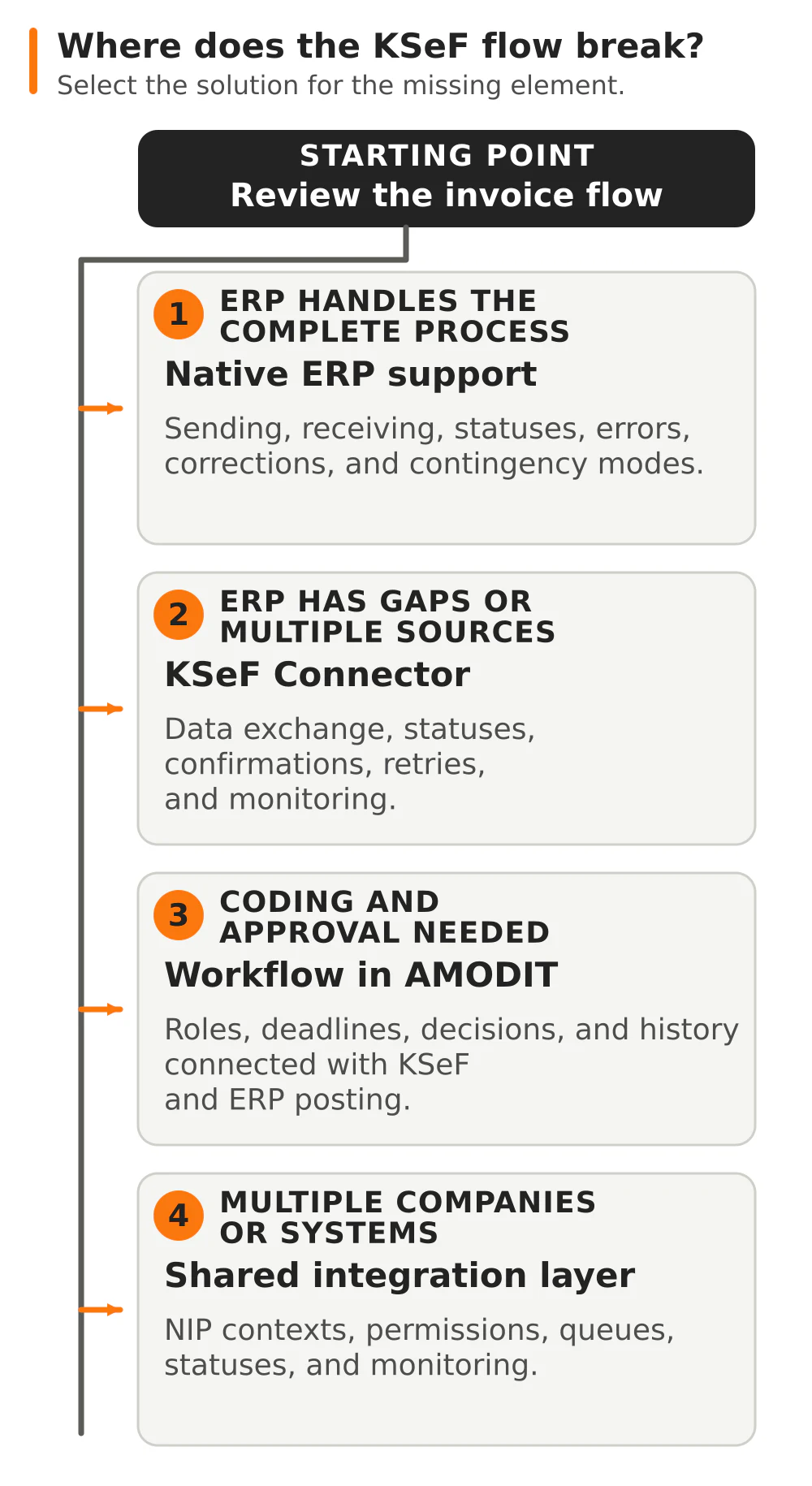
The right solution depends on where the process currently breaks down:
- The invoice is already in the company, but controlled coding, approval, permissions, deadlines, or multi-company handling is missing: start with AMODIT and design the process automation. The platform provides ready-to-use AI functions—AMODIT Copilot, an AI agent, AskAI, and agentic rules—that support tasks in the process. The result goes to the responsible person for review and approval.
- The problem is exchanging documents, statuses, and confirmations between KSeF and the ERP: consider KSeF Connector, Astrafox’s ready-made product for integrating KSeF with any ERP or accounting system.
- The company uses several applications or nonstandard rules: a custom integration or application may be needed to connect KSeF Connector, the workflow, and source systems.
- The ERP standard covers the entire process: use it without adding another layer. If the company uses Comarch ERP XL, also review the vendor’s functions and the implementation scope for the specific version.
This distinction prevents two opposite mistakes: building an extensive integration when the ERP standard is sufficient, and treating the connection to KSeF itself as a complete invoice workflow.
What does KSeF mean for a company in October 2026?
As of October 10, 2026: the obligation to receive invoices through KSeF has applied since February 1, 2026. The obligation to issue invoices was introduced in stages: from February 1 for the largest taxpayers and from April 1 for the remaining taxpayers. A temporary exception for the smallest taxpayers applies through the end of 2026. Details and statutory exclusions are described by the Polish Ministry of Finance in its current scope of mandatory KSeF.
For medium, large, and enterprise companies operating in Poland, the question “Will KSeF be mandatory?” is therefore settled. The question now is whether the entire process also works correctly when a document is rejected, the system is unavailable, permissions change, a purchase invoice requires approval, or several companies are involved.
KSeF accepts a structured invoice in XML format and assigns a KSeF number after successful acceptance. This number does not replace the invoice number assigned in the ERP—the company must store and reconcile both identifiers. Sending the file does not complete the process: the ERP should receive the status, KSeF number, and confirmation, or clear information about the error.
Four common KSeF–ERP integration scenarios
Not every company needs the same architecture. The starting point depends on the ERP’s capabilities, the purchase invoice process, and the number of systems and entities.
1. The ERP provides native KSeF support
If the ERP vendor provides KSeF support in the version in use, first verify its actual scope. Confirm sales submission, purchase invoice retrieval, return of the KSeF number and confirmations, validation, corrections, offline modes, and error handling separately. Also verify licenses, updates, and dependencies on additional modules.
A native function is a good choice when one ERP handles the entire process and the company does not need to connect several companies or systems. For Comarch ERP XL, the vendor’s functions and solutions implemented by Astrafox are described on the supporting page KSeF in a Comarch ERP XL environment. The scope for the specific system version must be verified before the project.
2. The ERP does not support KSeF or supports it only partially
An integration layer separates the source system from communication with KSeF. The ERP sends and receives data through an agreed interface, while the integration layer handles mapping, validation, statuses, confirmations, retries, and monitoring.
This is how KSeF Connector works: it connects KSeF with any ERP or accounting system. It is designed for organizations that want to keep their current system, connect several applications, or avoid building a separate integration from scratch for every invoice source.
3. A purchase invoice requires coding and approval
Retrieving an invoice from KSeF does not establish who confirms the expense, assigns the cost center, matches the document to an order, and approves payment. This process should run in a workflow system and, after approval, transfer the complete data set to the ERP for posting.
A common situation: an accounting specialist sees a new invoice from KSeF but searches through emails for the person who placed the order and the appropriate approver. Time is spent establishing responsibility while the payment deadline continues to run. After the change, the document enters a case with an assigned owner, approval rule, deadline, and decision history.
In new projects, Astrafox implements AMODIT as the process layer and connects it with KSeF Connector and the ERP. AMODIT manages the repository, permissions, document coding, and approval, while the integration sends the approved data to the ERP for posting. Companies using Comarch can also review the supporting description of the purchase invoice workflow with KSeF and ERP XL. Comarch BPM functions are vendor functions; the choice of solution depends on the existing architecture and target process.
The invoice arrives, but the rest of its workflow still runs through email? Discuss the document workflow in AMODIT →
4. The group has multiple companies and systems
Each entity operates in KSeF under its own Polish tax identification number (NIP). This means separate settings, authentication, and permission controls, even when the group uses a shared services center, one IT team, or the same accounting firm.
A common integration layer organizes communication but must not blur the companies’ responsibilities. Separate queues, statuses, and monitoring are required, together with a clear answer as to which ERP, sales system, or workflow is the data source for each entity.
KSeF readiness checklist
- Scope of the obligation for each entity. Confirm the NIP numbers, types of invoices issued and received, statutory exclusions, and process owner in each company.
- Responsibilities of finance and IT. Finance owns business and tax rules, while IT owns integration, security, and continuity. One person should coordinate the entire flow between teams and vendors.
- Tokens, certificates, and permissions. Inventory the credentials, their owners, scopes, and places of use. Establish secure storage, revocation, and access changes when an employee leaves. The Ministry of Finance explains KSeF certificates and their relationship to tokens.
- Two-way integration. Verify not only sales submission, but also purchase invoice retrieval, corrections, the KSeF number, confirmations, statuses, and rejection messages. Define where users see the result of each operation.
- Numbering and attachments. Retain the relationship between the invoice number in the ERP and the separate KSeF number. Establish which information enters the invoice structure and which remains in the workflow system. Invoices with attachments in KSeF require prior notification through Poland’s e-Tax Office, and the attachment is not intended for sending arbitrary contracts, protocols, or marketing materials, as explained in this Ministry of Finance notice.
- Approval workflow. Document the rules for expense coding, order matching, substitutions, approval thresholds, and exceptions. An invoice retrieved from KSeF should automatically enter the appropriate process, not a shared inbox with no owner.
- Archiving and process documentation. KSeF retains invoices for 10 years, counted from the end of the year in which they were issued. The company still needs its own operational documentation: coding, approvals, order relationships, and attachments that are not part of the structured invoice.
- Errors and contingency modes. Prepare a rejected-document queue, assign responsibility for corrections, and provide a retry mechanism. The procedure must distinguish a data problem, connection failure, planned downtime, a KSeF outage, and a total outage. In offline24 mode, the invoice must be submitted no later than the next business day; the remaining rules depend on the type of unavailability.
- Testing and monitoring. Test a valid document, rejection, duplicate, correction, lack of response, credential expiration, and resumption after an interruption. In production, monitor queues, the time of the last successful exchange, and documents without a final status.
- Cooperation with an accounting firm. Grant only the necessary permissions and document the division of responsibility for retrieval, posting, corrections, and errors. The accounting firm authenticates separately in the context of each client’s NIP, so the integration must reflect this model.
The most common problems after KSeF goes live
- The project ends with the API connection. No one owns rejected documents, notifications, or the check that the invoice returned to the ERP with its KSeF number.
- The company prepares only for sales. Purchase invoices enter KSeF but do not trigger coding, approval, and posting.
- One credential covers too broad a scope. No one knows who uses it, where it is stored, or how quickly access can be withdrawn.
- The PDF remains the primary document in the process. Structured data is stored in XML, while the visualization is intended for people. Integration and validation should not rely on reading a PDF.
- Testing covers only the ideal case. The first rejection, outage, or duplicate reveals that users do not know where to check the status or who should respond.
- KSeF is treated as a complete document workflow. The government system exchanges and stores invoices, but it does not replace company rules for expense coding, approvals, budgets, and responsibility.
What does a KSeF integration project look like?
1. Inventory. We collect the systems that issue and receive invoices, entities, interfaces, volumes, the purchasing workflow, users, and current sources of errors.
2. Process and architecture design. We establish the source system for each field, the scope of the ERP standard, the need for an integration layer and workflow, the permission model, and exception handling. The result is a flow from document creation or retrieval to final status and posting.
3. Configuration and integration. We configure the selected solution, data mapping, authentication, return communication, monitoring, and notifications. ERP vendor functions remain clearly separated from Astrafox components and services.
4. Business and technical testing. Finance verifies documents, corrections, and exceptions, while IT verifies security, performance, outages, and recovery. Testing concludes with a list of acceptance criteria, not simply a successful submission.
5. Go-live and maintenance. We switch the process according to the agreed plan, monitor the first settlement cycles, and provide documentation. After launch, we update the integration as KSeF, the ERP, and the company’s process change.
How does Astrafox support companies with ERP systems?
Astrafox combines four complementary capabilities. AMODIT organizes workflows, approvals, roles, deadlines, and multi-company work. KSeF Connector provides a ready-made integration layer for any ERP. Custom integrations and applications address nonstandard rules or connections between several systems. In a Comarch ERP XL environment, we also implement processes that use the vendor’s functions—Astrafox is a Comarch Authorized Integrator and has been a partner since 2003.
We define the scope after reviewing standard ERP functions and the existing architecture. The first discussion establishes whether the company needs an AMODIT process, the KSeF Connector layer, integration work, or configuration of the current system—without adding a separate solution where the ERP covers the entire required flow.
FAQ: KSeF and ERP integration
Does KSeF replace an ERP or accounting system?
No. KSeF handles the issuing, sending, receiving, and storage of structured invoices. The ERP continues to handle sales, posting, settlements, master data, and other company processes.
Do we need KSeF Connector if the ERP has its own KSeF support?
Not always. First compare the ERP’s functions with the company’s entire process. Connector is justified when the standard does not support the required flow, the organization has several systems or companies, or it needs shared monitoring and a workflow connection.
Does KSeF handle purchase invoice approval?
KSeF provides the invoice but does not replace the internal expense coding and approval process. This stage is handled by the ERP or a workflow system such as AMODIT or, in a Comarch environment, Comarch BPM functions.
Can one accounting firm serve several companies?
Yes, if it receives the appropriate permissions. Access to invoices and invoice issuance still take place separately in the context of each client’s NIP, which should be reflected in the configuration and users’ responsibilities.