DataFlow
Interface, projects, pipeline descriptions, catalog, diagrams, permissions, and AI assistant.
Purpose: a shared workspace for working with data.DataFlow combines a team workspace, an open execution layer, and the client's infrastructure. Data remains in the organization's data warehouse, logic is stored in SQL and dbt, and every change undergoes validation and controlled publication.
DataFlow connects the team's workspace with the execution layer and infrastructure. Processing logic is stored in SQL and dbt, while data remains in the client's data warehouse.
Interface, projects, pipeline descriptions, catalog, diagrams, permissions, and AI assistant.
Purpose: a shared workspace for working with data.Data ingestion, processing, tests, schedules, dependencies, and runs.
Purpose: runs the published logic.Data warehouse, application database, file storage, identity, network, and container environment.
Purpose: remains the operating and maintenance environment.Airbyte handles connectors and synchronization, dbt handles SQL models, tests, and documentation, while Dagster handles schedules, dependencies, and runs. Definition history is stored in Git.
Data is ingested from sources into the data warehouse and processed there. Ready-to-use models are provided to Power BI, Tableau, Excel, or another analytics tool.
Reduced vendor dependence: business logic is stored in SQL and dbt, configuration history is kept in a repository, and execution relies on widely used components. The client retains its work even after the engagement ends.
A working project separates change preparation from the published configuration. The team sees file differences, dependencies, and the complete publication plan; the platform detects conflicts and protects against partial writes.
Results on real data can be filtered, sorted, viewed at row level, and exported to CSV or XLSX.
Models include descriptions, dependencies, and tests for completeness, uniqueness, relationships, and business rules.
The scope of the change and validation result are visible. Publication is performed only by a person with the assigned permission.
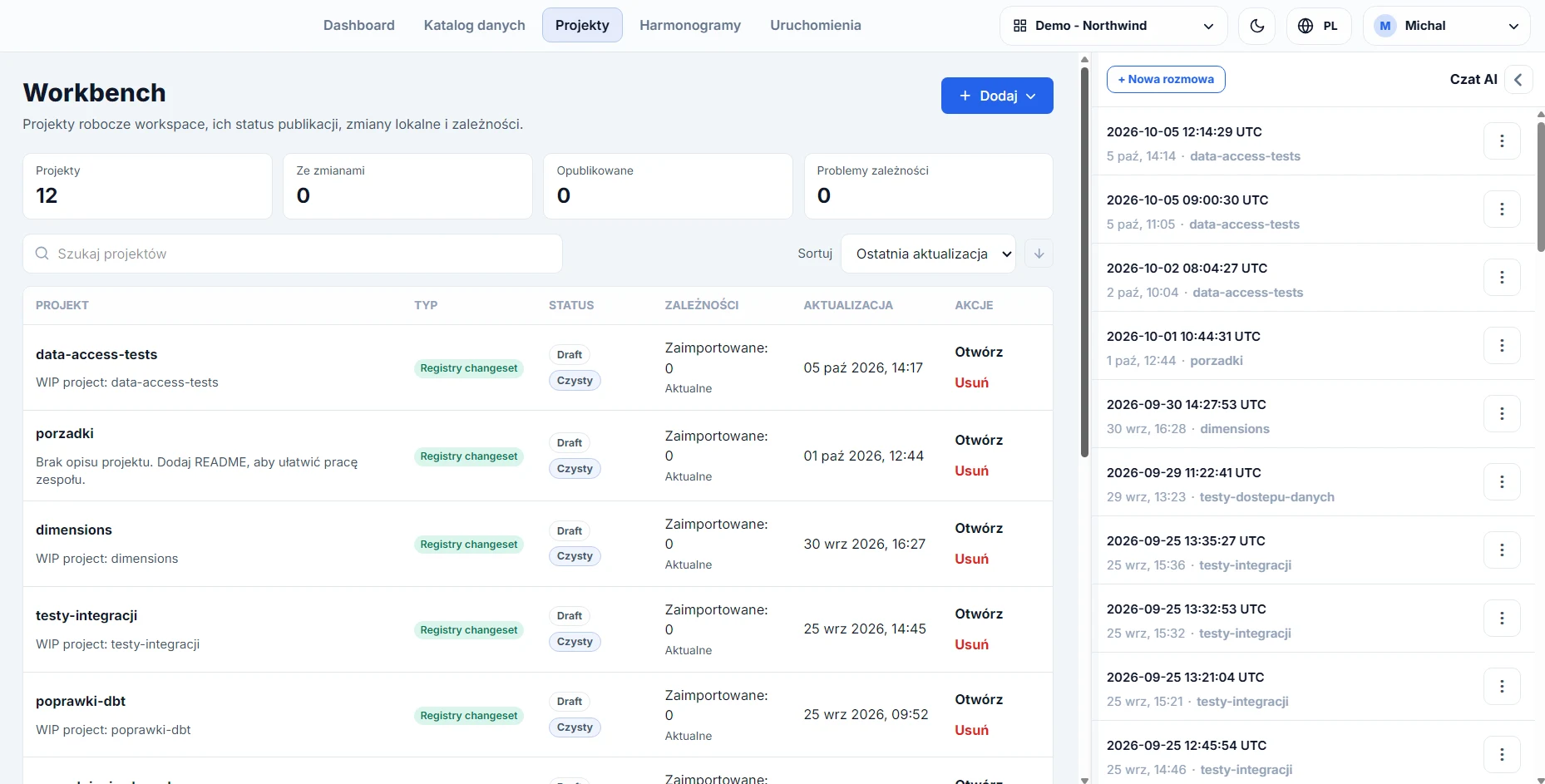
Workbench shows projects, their publication status, local changes, and dependencies. The AI assistant prepares a proposal in the project context. Every proposal undergoes validation and review, and publication requires permissions assigned to the appropriate role.
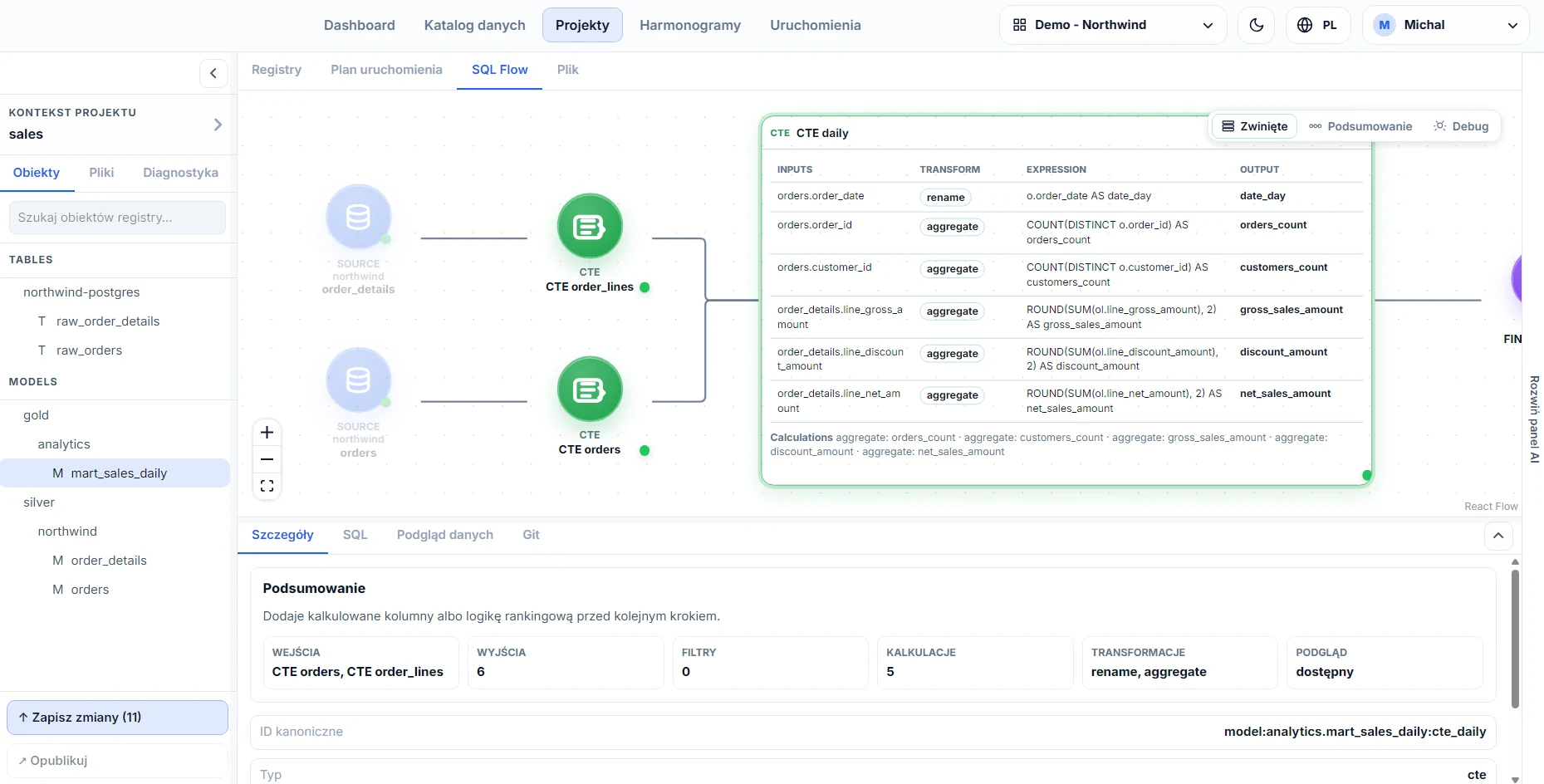
The graph shows sources, intermediate stages, and the final model. For the selected step, the panel presents input columns, transformation type, expression, and output column, while a summary describes the role of the step in plain language.
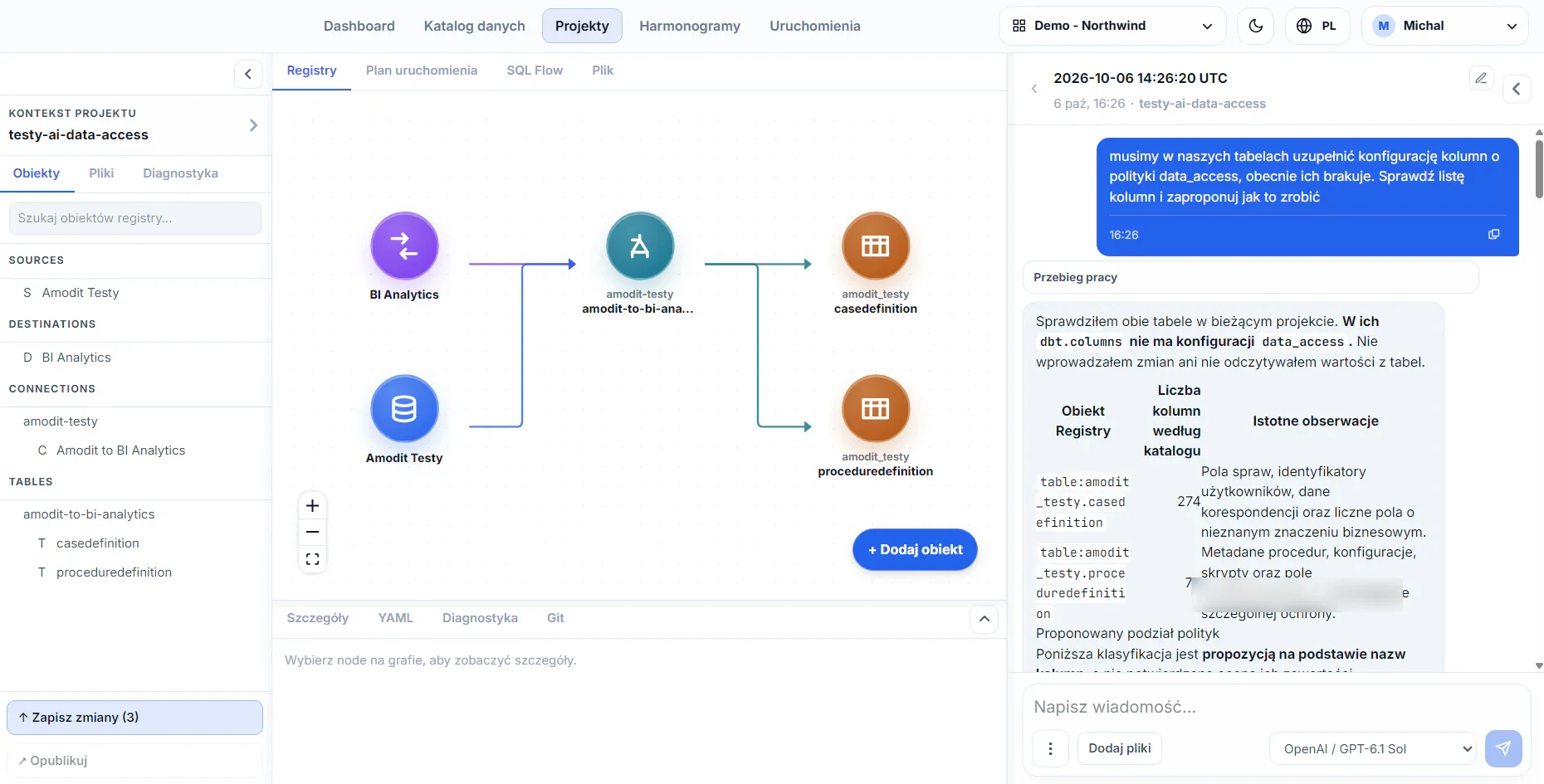
The assistant has access to the data structure: the catalog, model definitions, dependencies, validation results, diagnostics, and run history. It explains models, prepares proposed changes, and analyzes errors.
The assistant operates within its permissions and in a project, not in the live solution. What it analyzes and proposes remains visible.
The client selects the language model provider, pays it directly, and decides what information is sent to its service.
A lower-cost model can handle short, repeatable tasks, while a more capable model can prepare changes. Settings limit the number of assistant work cycles.
Every proposal undergoes validation, scope review, and publication by an authorized person. The same control path applies to changes prepared by AI and by people.
The complete description shows where configuration is stored, how changes are checked, and which information remains available to the administrator and data team.
The wizard lets the user search for a connector, enter access details, test the connection, and select data sets. Full or incremental ingestion can be configured, depending on the source.
Benefit: access problems are detected without building every connection from scratch.A saved credential can serve multiple sources. Secret values are not displayed again; their use and change history remain visible.
Benefit: access can be rotated in one place, without passwords in configuration files.One instance supports multiple workspaces with their own integrations, credentials, and roles. A separate permission controls pipeline execution.
Benefit: a shared platform does not mix access and responsibility.Sources, destinations, tables, models, tasks, and processes are described together. A visual editor and forms show the complete structure without requiring knowledge of the configuration format.
The logic covers cleaning, standardization, joins, aggregations, and calculations. Models include descriptions, dependencies, and tests for completeness, uniqueness, relationships, and business rules.
Results on real data can be filtered, sorted, viewed at row level, and exported to CSV or XLSX. A business rule can be verified in the same environment.
Search leads to asset cards with the owner, description, schema, freshness, columns, test results, and change history.
A graph shows model dependencies and column-level lineage, while visual SQL analysis breaks a query into stages described in plain language.
Runs, steps, duration, records, and errors are visible. A task can be started manually, retried, or canceled according to permissions.
Configuration has a history, version differences, and support for parallel work. Changes can be reviewed in the application without knowledge of development tools.
The client owns the data warehouse regardless of where the platform runs. Before implementation, we define access, responsibilities, and the information sent to external services.
The platform supports local sign-in and OIDC-based SSO. We configure the connection to the corporate identity system during implementation.
Application roles determine access to features, while data warehouse permissions determine access to data. BI users can receive access to the analytics layer only.
Secrets can be replaced but not read. The history shows who changed them and which sources use them.
The assistant operates within assigned permissions. The client decides which service receives the supplied context.
The repository, credential history, run logs, and operation statuses make it possible to trace changes and runs.
Permissions are verified on the server, and a change enters use only after validation and review.
The Registry view connects the source, connection, and target tables. The AI assistant analyzes columns and proposes access policy settings. A person reviews and approves the proposal before publication.
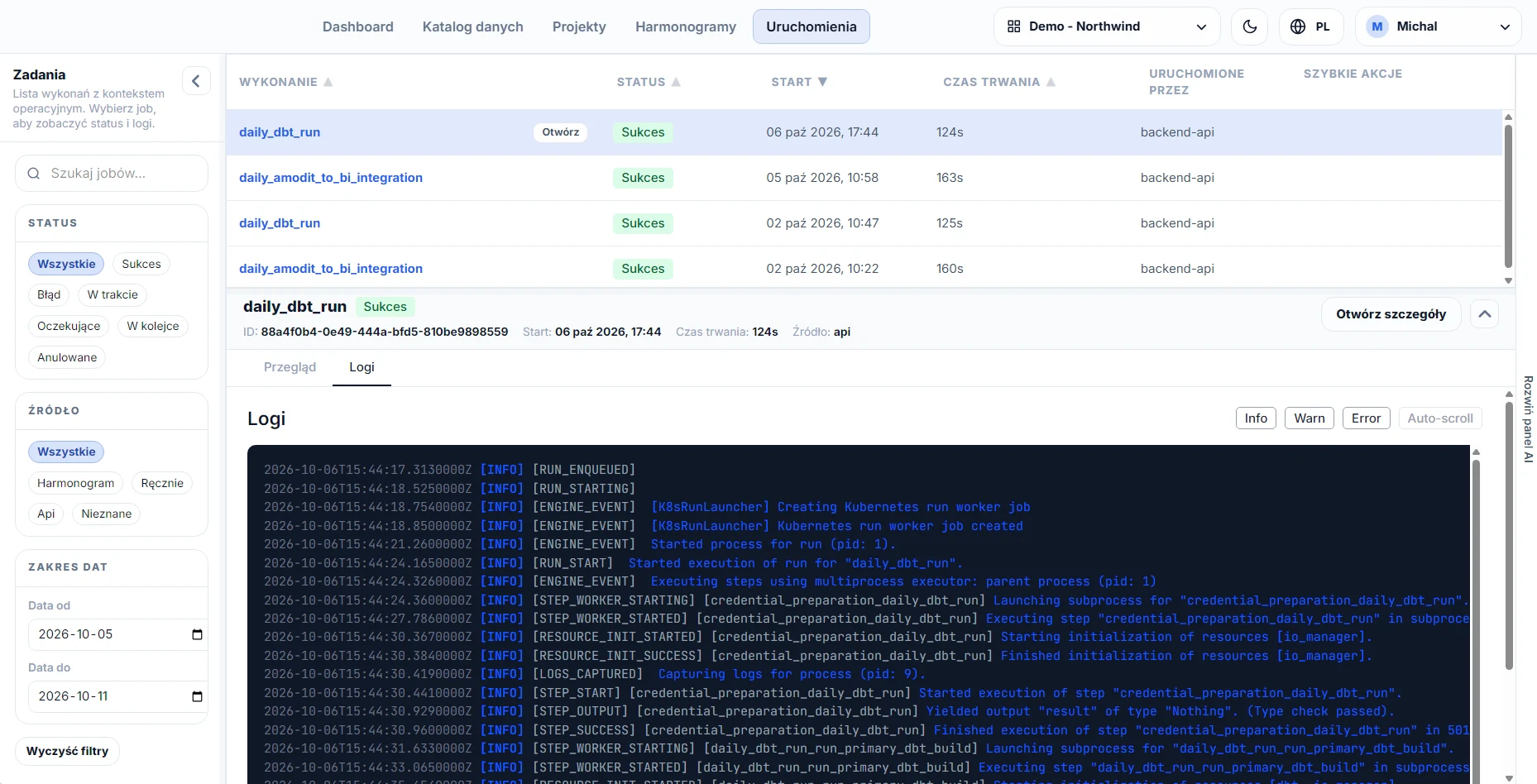
The run list shows status, start time, duration, and record count. Selecting a task opens its details and logs, making it possible to review the execution or find the cause of an error without opening a separate console.
DataFlow uses an ecosystem of more than 500 ready-made connectors. We connect a system through an API, database, file, or a connector built for an internal application.
| Category | Example systems and sources |
|---|---|
| ERP and accounting | Comarch ERP XL and Optima, enova365, Symfonia, Subiekt, SAP |
| CRM and sales | Pipedrive, HubSpot, Salesforce |
| Customer service and help desk | Freshdesk, Zendesk, Intercom |
| Work and projects | Jira, Asana, Monday, Paymo, Trello |
| Marketing and advertising | Google Ads, Meta Ads, LinkedIn Ads, Google Analytics, Mailchimp |
| Databases | Microsoft SQL Server, PostgreSQL, MySQL, Oracle, MongoDB |
| Files and file services | Excel, CSV, Google Sheets, SharePoint, FTP, SFTP, and object storage |
| Internal systems | Custom applications through an API, database, or custom connector |
| Starting point | Current state | What DataFlow changes |
|---|---|---|
| Spreadsheets | Data downloaded manually, logic stored in formulas, and versions saved as dated files. | Automated ingestion, transparent logic, change history, and tests before publication. Excel remains the consumption tool. |
| Alteryx or KNIME on workstations | A workflow stored as a file on a computer, a license assigned to a person, and versions managed through file names. | A central platform, server-based runs, a diagram with stage descriptions, and review of differences between versions. |
| Server version of Alteryx or KNIME | Logic in the tool's format, processing in its engine, with the catalog and lineage handled separately. | Logic in SQL and dbt, processing in the client's data warehouse, history in Git, and a built-in catalog and column-level lineage. |
| Custom open-source stack | Separate Airbyte, dbt, and Dagster consoles, with in-house integration and maintenance. | One application: a shared pipeline description, catalog, roles and permissions, and a team that implements and maintains the solution. |
DataFlow needs connections to data sources and the data warehouse. The AI assistant connects to the selected model provider's service. The pre-implementation environment analysis identifies specific communication paths and assigns responsibility.
After activation, DataFlow operates without a permanent connection to the license server for the validity period of the installed license. The administrator receives advance notice that the license is approaching its expiration date.
An offline activation mode is available for installations without Internet access.
DataFlow development includes handling known vulnerabilities and security updates. See how we assess the product against Cyber Resilience Act (CRA) requirements.
Every component has its own automated test suite. A release is created only after all tests pass.
Every release undergoes checks for known vulnerabilities and a security gate with a defined exception-handling process.
Tests cover administration, integrations, credentials, catalog, lineage, changes, pipelines, schedules, and runs.
Logic is stored in SQL, configuration history is kept in the client's repository, and the execution layer uses open components.
The client selects the model provider and decides which service receives the supplied context. We define the scope of information sent to the model during implementation.
In the client's infrastructure or in an environment hosted by Astrafox. In both options, the data warehouse remains on the client's side.
The license itself does not require a permanent connection: after activation, the platform operates without a connection to the license server for the license validity period, and offline activation is available for Internet-isolated installations. Other connections depend on the sources, data warehouse, and selected AI service.
A change is created in a working project. The team reviews differences, dependencies, validation results, and the data preview, while a person with the appropriate permission performs the publication.
We will map the sources, data warehouse, identity, network connections, and responsibility for maintenance.
Describe your data environment